Wednesday, November 16, 2011

Cloud Foundry

A little background
Cloud Foundry project is an open-source platform-as-a-service (PaaS) project initiated by VMware. CloudFoundry.com is a VMware hosted, managed and supported PaaS environment. Micro Cloud Foundry is a complete version of Cloud Foundry that runs in a virtual machine on a developer’s Mac or PC.

Try Cloud Foundry
There are 2 ways: install it from github or use Micro Cloud Foundry virtual machine image provided by cloudfoudry.com. The second method is relatively simple and requires an CloudFoundry.com account. Because I already have an account, I used the second method.
The testing was not very smooth by following Micro Cloud Foundry Quick Start guide. The major problem was the network issue: the VM image uses the bridged network, however, in my env, it bound to the wrong network physical adapter (you should be careful about this especially when you have multiple network adapters or you have Virtualbox installed). The cloud foundry setup didn't pointed out this problem. This caused me to use vcap.me as the domain.
To fix above issue, I need use the virtual network editor to change the binding from automatic to a dedicated network adapter. The VMware player doesn't install the virtual network editor by default, I had to follow this guide to manually extract the installation file (VMware-player-xxxx.exe /e folder-name) , find the network.cab and extract the vmnetcfg.exe and copy it to VMWare Player folder. (C:\Program Files (x86)\VMware\VMware Player).
Another issue is VCAP ROUTER: 404: after setting up the micro cloud, vmc command failed with below message: Error (JSON 404): VCAP ROUTER: 404 - DESTINATION NOT FOUND I tried reconfiguring the domain in micro cloud setup menu, the problem was gone.

Thoughts
As for cloud computing, provisioning VM instances or application instances is relatively easy, the resource management is a challenge.


Friday, October 28, 2011

Build FBReader on Solaris

Here are my steps.
Environment: 
Solaris 11 Express x64
Gnome desktop
gcc-3.4.3
PATH=/usr/sfw/bin:/usr/gnu/bin:/usr/bin:/bin

Step 1: Build the dependencies first
$./configure; make; sudo make install
These libraries will be installed in /usr/local/lib

Step 2: Build FBReader-0.12.10
Need some hacks here.
1) makefiles/arch/desktop.mk
     13 CFLAGS = -pipe -fno-exceptions -Wall -Wno-ctor-dtor-privacy -W -DLIBICONV_PLUG -DDO_ICONV_CAST
     14 LDFLAGS = -L /usr/local/lib -R /usr/local/lib
2) fbreader/src/formats/fb2/FB2Reader.h
 It seems "_P" had been defined somewhere and cause enum declaration errors.
     23 #include <ZLXMLReader.h>
     24
     25 #undef _P
     26
     27 class FB2Reader : public ZLXMLReader {
3) zlibrary/core/src/unix/library/ZLibrary.cpp
Thanks to Rod Evans' great catch, I added an extra dlerror() to make sure it returns NULL before calling dlsym().
    128         void (*initLibrary)();
    129         dlerror();
    130         *(void**)&initLibrary = dlsym(handle, "initLibrary");
4) make; sudo make install
5) /usr/bin/FBReader &  (or run it from GNOME menu: start -> Office ->E-book reader)
Have fun.

Thursday, March 3, 2011

crazy CSS, thanks DTrace

I hate many enterprise applications because of very unpleasant user experiences. Here's a recent example.
When I opened an application in firefox browser, my computer nearly hanged. Using basic Solaris commands prstat, mpstat, etc, I found displaying this page caused huge number of (40K) context switches per second.
At first, I thought it might be because of some ugly javascripts. So I first checked the source of this web page, well it contains several big java script files (sum up over 1MB), then I disabled the javascript in browser, however, the problem remained. I also tried offline browsing, it didn't solve the problem, so this is not a networking issue.

What's wrong?

~# truss -c -p 1224  (#1244 is firefox process ID)
^C
syscall               seconds   calls  errors
read                     .016    3097     777
write                    .022    2126       1
open                     .000       2
close                    .000       4
fstat                    .000       2
access                   .000       1       1
ioctl                    .005    1145
fdsync                   .003       1
fcntl                    .000       6
lwp_park                 .236   28575     330
lwp_unpark               .177   28340
sigaction                .000      52
...

It looks like lwp_park/lwp_unpark are evils. Use a Dtrace script to find who caused this.

~# cat lwp_park.d
#!/usr/sbin/dtrace -qs
syscall::lwp_park:entry
/pid==$target/
{
 @[ustack()]=count();
}
END
{
trunc(@, 10);
}

./lwp_park.d -p 1244   

Then switch to the problemed web page in firefox, go back to that terminal running DTrace, type Ctrl-C.
The DTrace output the user stacks for causing both lwp_park() and lwp_unpark() which is interesting. After demangling C++ symbols, I got:

              libc.so.1`__lwp_unpark+0x19
              libnspr4.so`PR_Unlock+0x102
              libxul.so`unsigned TimerThread::RemoveTimer(nsTimerImpl*)+0x7e
              libxul.so`unsigned nsTimerImpl::Cancel()+0x32
              libxul.so`unsigned imgContainer::FrameUpdated(unsigned,nsIntRect&)+0xbd
              libxul.so`void row_callback(png_struct_def*,unsigned char*,unsigned long,int)+0x187
              libxul.so`MOZ_PNG_proc_IDAT_data+0x190
              libxul.so`MOZ_PNG_process_data+0x4ce
              libxul.so`unsigned ReadDataOut(nsIInputStream*,void*,const char*,unsigned,unsigned,unsigned*)+0x8c
              libxul.so`unsigned nsStringInputStream::ReadSegments(unsigned(*)(nsIInputStream*,void*,const char*,unsigned,unsigned,unsigned*),void*,unsigned,unsigned*)+0x47
              libxul.so`unsigned nsPNGDecoder::WriteFrom(nsIInputStream*,unsigned,unsigned*)+0x3a
              libxul.so`unsigned imgContainer::ReloadImages()+0x339
              libxul.so`unsigned imgContainer::GetCurrentFrameRect(nsIntRect&)+0x1a1
              libxul.so`unsigned imgRequest::NotifyProxyListener(imgRequestProxy*)+0x10f
              libxul.so`unsigned imgRequestProxy::Clone(imgIDecoderObserver*,imgIRequest**)+0xe7
              libxul.so`unsigned nsImageLoader::Load(imgIRequest*)+0x52

libxul.so`already_AddRefednsImageLoader::Create(nsIFrame*,imgIRequest*,int,nsImageLoader*)+0x57
              libxul.so`void nsPresContext::SetupBackgroundImageLoaders(nsIFrame*,const nsStyleBackground*)+0x98
              libxul.so`void nsCSSRendering::PaintBackgroundWithSC(nsPresContext*,nsIRenderingContext&,nsIFrame*,const nsRect&,const nsRect&,const nsStyleBackground&,const nsStyleBorder&,unsigned,nsRect*)+0x93f
              libxul.so`void nsCSSRendering::PaintBackground(nsPresContext*,nsIRenderingContext&,nsIFrame*,const nsRect&,const nsRect&,unsigned,nsRect*)+0xea
            24658

              libc.so.1`__lwp_park+0x19
              libc.so.1`cond_wait_queue+0x60
              libc.so.1`cond_wait_common+0x1eb
              libc.so.1`__cond_timedwait+0x66
              libc.so.1`cond_timedwait+0x27
              libc.so.1`pthread_cond_timedwait+0x24
              libnspr4.so`PR_WaitCondVar+0x24a
              libxul.so`unsigned TimerThread::Run()+0x11c
              libxul.so`unsigned nsThread::ProcessNextEvent(int,int*)+0x121
              libxul.so`int NS_ProcessNextEvent_P(nsIThread*,int)+0x2d
              libxul.so`void nsThread::ThreadFunc(void*)+0xa7
              libnspr4.so`_pt_root+0xe7
              libc.so.1`_thrp_setup+0x9b
              libc.so.1`_lwp_start
            26335 
The stack of lwp_unpark() is often more interesting, because lwp_park() is usually caused by waiting for a condition variable which does not directly tell you what the application is waiting for. While if there are many lwp_park(), then there are many lwp_unpark() accordingly, so I looked at lwp_unpark() stack. I'm not a browser expert, from the function name, the firefox seemed to do rendering background based on CSS.  Then I checked the CSS file which size is 150KB, Damn, there're 571 occurences like below:

{background: url(../xxx/yyy/zzz.png)} 

Then I wanted to check how many times  nsCSSRendering::PaintBackground() was called by using another DTrace script.

 From:
libxul.so`void nsCSSRendering::PaintBackground(nsPresContext*,nsIRenderingContext&,nsIFrame*,const nsRect&,const nsRect&,unsigned,nsRect*)+0xea  

#!/usr/sbin/dtrace -s
pid$target:libxul:__1cOnsCSSRenderingPPaintBackground6FpnNnsPresContext_rnTnsIRenderingContext_pnInsIFrame_rknGnsRect_9AIp7_v_:ea
{
 @ =count();
 Ran this DTrace script, and switched to the problemed web page in firefox. this time DTrace output:
~# ./pid.d -p 1244
dtrace: script './pid.d' matched 1 probe
^C
              422
It indicated rendering this web page caused the firefox painted background 422 times (via X window), crazy!!! On the other hand, it looks like firefox's libxul.so should be improved when it renders these images. It caused about 25,000 context switches. Is it because that rendering the images is in asynchronous way and the rendered data are in local memory or on fast network so that context switches occurred so fast?

Workaround: In firefox settings, Preference -> Contents -> Load images automatically -> Exceptions -> add this website to block list.


Tuesday, October 26, 2010

JiuZhai_HuangLong

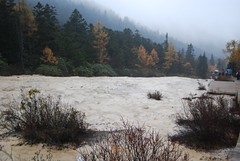
JiuZhai and HuangLong are my wife's dream vacation places for years. This October we finally embarked on the journey. The cost of 3-days trip was very high (even more expensive than some overseas travel), but the view is very beutiful and unique. More photos taken by me can be found here, here.


Thursday, September 2, 2010

Sun set in China

Sun, my favorite brand.
Sun, my favorite logo.
Sun, the best engineering culture I have met with.
Sun, the most important career experience for me.
Sun, set in China on August 31st, 2010.